I Built Subaddressify: A Simple Privacy Tool for Email Aliases
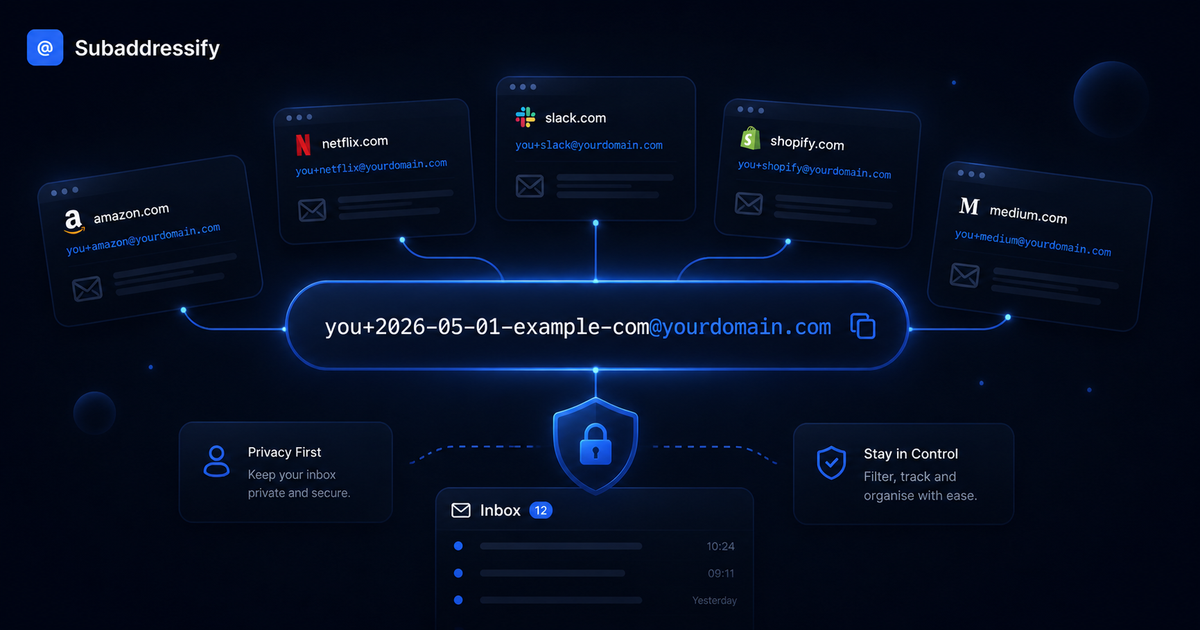
Most people use the same email address everywhere.
Shopping websites, newsletters, free downloads, competitions, SaaS tools, apps, forums - the same email address gets reused again and again.
It feels convenient, but there is a problem.
Once your email address is shared across hundreds of websites, you lose visibility. If spam starts arriving, or your details appear in a data breach, it becomes difficult to know where the problem came from.
That is why I built Subaddressify.
Subaddressify is a free Chrome extension that helps you generate a unique email sub-address for every website you sign up to.
Instead of using:
name@gmail.comYou can use something like:
name+2026-05-06-example-com@gmail.comThe email still arrives in your normal inbox, but now you know exactly where and when that email address was used.
What is email sub-addressing?
Email sub-addressing, also known as plus addressing, lets you add extra information to your email address using the + symbol.
For example:
name+shopping@gmail.comThese emails usually still land in your normal inbox, but the extra label gives you useful context.
Subaddressify makes this easier by automatically creating an email alias based on the website you are visiting and the current date.
So instead of manually typing and formatting it yourself, the extension generates it for you.
Why this is useful for privacy
Subaddressing gives you traceability.
Let’s say you sign up to a website using:
name+2026-05-06-example-store@gmail.comA few months later, you start receiving spam or suspicious emails sent to that exact address.
You now have a clue.
It could mean that the company shared your data, sold it, leaked it, or had it exposed through a breach. Without a unique sub-address, you would have no easy way of knowing where that email originally came from.
This does not prevent data breaches, but it does give you visibility when something goes wrong.
And in cybersecurity, visibility matters.
Why I built it
I was already using this method manually.
My format was usually:
name+yyyy-mm-dd-website@gmail.comIt worked well, but it was annoying to type every time. I had to remember the format, check the date, clean up the website name, and make sure I did not make a mistake.
That friction makes good privacy habits harder to keep.
So I built Subaddressify to make the process quick and simple.
You add your base email address once, visit a website, click the extension, and it generates the sub-address for you.
Privacy-first by design
Because this is a privacy tool, I wanted it to be private by default.
Subaddressify does not require an account. It does not send your email address to a server. It does not track your usage. It does not collect analytics.
Your base email is stored locally in your browser, and the generated aliases are created on your device.
That was important to me. A tool designed to improve privacy should not become another source of data collection.
How it fits into better cybersecurity habits
I have written before about online safety, passwords, two-factor authentication and data breaches.
Subaddressify fits into the same theme: small habits that improve your overall security.
Using unique passwords protects your accounts.
Using two-factor authentication adds another layer of defence.
Using unique email sub-addresses helps you understand where your email address has been used and where problems may have started.
It is not a replacement for proper security, but it is a simple extra layer.
Final thoughts
Subaddressify is a small tool, but it solves a real problem.
It helps you create unique email addresses for different websites, trace where spam may have come from, and take back a bit more control over your inbox.
It is free, privacy-first, and built to do one job well.
You can install it from the Chrome Web Store or visit subaddressify.com to learn more.
Comments ()