Autonomous Parallel Engineering with Claude Code + Worktrunk + JIRA MCP
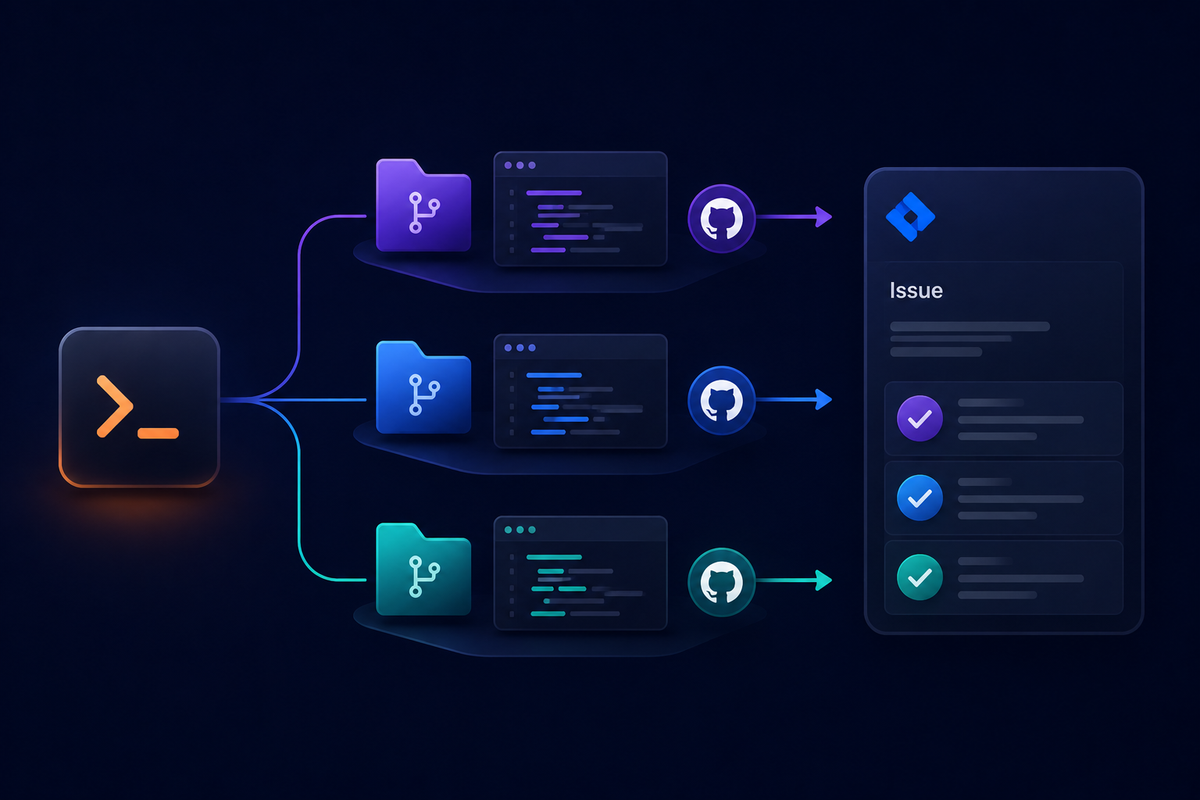
AI coding assistants are useful.
But they become game-changing when you stop using them as a chat tool… and start treating them as autonomous engineering agents.
Recently, I’ve been experimenting with a workflow combining:
- Claude Code (CLI)
- JIRA MCP server
- Worktrunk
- Parallel agent execution
The goal: multiple autonomous agents working on tickets simultaneously, handling planning, implementation, commits, and documentation — with minimal human interaction.
This article explains the architecture and workflow.
The Problem with Single-Agent AI Workflows
Most AI workflows look like this:
- Developer writes prompt
- AI generates code
- Developer reviews
- Developer commits
- Developer updates ticket
This still keeps humans in the loop for every step. It doesn’t scale.
What we actually want is:
- Autonomous planning
- Autonomous implementation
- Autonomous commits
- Autonomous documentation
- Autonomous ticket updates
- Multiple tasks running in parallel
The Architecture
The stack I use:
- Claude Code CLI → autonomous agent
- JIRA MCP Server → structured ticket access
- Worktrunk → branch + workspace isolation
- Git → version control
- Parallel agent runner → concurrency layer
Each ticket becomes an isolated agent execution environment.
High-Level Workflow
- Provide high-level description
- Claude generates structured JIRA ticket
- Ticket is updated automatically
- Agent creates implementation plan
- worktrunk checks out isolated branch
- Agent performs development
- Agent commits changes
- Agent generates implementation summary
- Agent updates JIRA ticket with:
- Summary
- Files changed
- Technical notes
- Follow-ups
Now imagine this happening across 5–10 tickets simultaneously.
That’s autonomous parallel engineering.
Step 1 — Ticket Generation via JIRA MCP
Instead of manually writing tickets, I provide a simple instruction:
"Add loading skeletons to dashboard widgets and improve perceived performance"
Claude uses the JIRA MCP server to:
- Expand the description
- Add acceptance criteria
- Define technical scope
- Identify impacted areas
- Suggest testing notes
The ticket becomes structured and implementation-ready.
No manual refinement needed.
Step 2 — Branch Planning
Once the ticket exists, the agent:
- Reads ticket content via MCP
- Generates implementation plan
- Identifies:
- files to change
- dependencies
- test updates
- risk areas
Example plan:
- Add skeleton component
- Update widget container
- Add loading state
- Update tests
- Improve suspense boundaries
This plan is saved into the ticket as a comment.
Step 3 — worktrunk Branch Isolation
Now worktrunk takes over.
Each agent runs:
- Isolated workspace
- Separate branch
- Clean git state
- No interference with other agents
This is critical for parallel execution.
Without isolation, agents would conflict constantly.
With worktrunk, you get:
- parallel feature branches
- independent commits
- concurrent execution
Step 4 — Autonomous Implementation
Claude Code now executes against the isolated workspace:
- Creates components
- Updates logic
- Refactors code
- Runs linting
- Fixes TypeScript errors
- Updates tests
No manual approvals.
The agent behaves like a mid-level engineer working independently.
Step 5 — Atomic Commits
Instead of dumping one large commit, the agent:
- Groups logical changes
- Creates atomic commits
- Writes meaningful commit messages
Example:
feat: add dashboard widget skeleton loader
refactor: extract widget container loading state
test: add loading state coverage
This keeps history clean — even though it’s fully automated.
Step 6 — Automatic JIRA Updates
After implementation, the agent posts a structured comment:
Implementation Summary
- Added skeleton loaders for widgets
- Improved perceived performance
- Updated suspense boundaries
Files Changed
- DashboardWidget.tsx
- Skeleton.tsx
- dashboard.test.ts
Notes
- No breaking changes
- Backwards compatible
Follow-ups
- Consider shimmer animation
This eliminates manual documentation.
Parallel Agent Execution
The real power comes from running multiple agents simultaneously:
Agent 1 → Performance improvements
Agent 2 → Accessibility fixes
Agent 3 → UI polish
Agent 4 → Refactor hooks
Agent 5 → Add tests
All working in parallel.
Each agent:
- creates its own branch
- runs independently
- commits independently
- updates its own ticket
This turns one developer into a team of autonomous agents.
Benefits
Massive Throughput
Multiple tickets completed at once.
Reduced Context Switching
You define goals, not implementation steps.
Consistent Documentation
Every ticket automatically updated.
Clean Git History
Atomic commits generated automatically.
Scalable Workflow
Works for solo developers and teams.
Example Command Flow
Typical workflow:
- Describe tasks
- Agents generate tickets
- Agents start in parallel
- Work completes
- Review PRs
Human involvement is reduced to:
- defining intent
- reviewing final output
Everything else is automated.
Where This Works Best
This approach excels for:
- UI improvements
- Refactors
- performance tweaks
- test coverage
- documentation
- small features
For large architectural work, human guidance is still recommended.
The Future: Fully Autonomous Sprint Execution
The logical next step:
- Agents pick tickets from backlog
- Estimate complexity
- Execute in priority order
- Open PRs
- Request review
At that point, you're no longer using AI as a tool — you're running an autonomous engineering system.
Final Thoughts
Using Claude Code with worktrunk and JIRA MCP transforms AI from:
"help me write code"
into:
"execute engineering tasks autonomously"
And when you add parallel agents, the productivity multiplier becomes enormous.
This is the closest thing I’ve seen to AI-native software development workflows.
If you're already using Claude Code, the next step isn't better prompts.
It's multiple autonomous agents working in parallel.
Comments ()